A Free Drawing Timer and Reference Image Library Built for the Art Classroom
If you have ever searched for a drawing timer that actually works for your art classroom — on that’s student-safe, flexible and read to run in under thirty seconds — you already know how hard they are to find. Most timed drawing tools are built for adult animators and illustrators, not for a room full of high schoolers on Chromebooks.
The Art Teacher Tools Photo Reference Generarator is different. It’s a free, browser-based drawing timer with a curated photo reference library that covers anatomy, still life objects, animals and landscapes. No account is needed, no account required and no inappropriate content is displayed. Our web app is just a clean, reliable tool that works the moment your students sit down.
High School Photo References
Why Timed Drawing Works
Focusing on essential actions & form
Additional Resources:
What is Gesture Drawing?: The Pencil Room
Gesture Drawing: Proko
Timed Gesture Drawing: Jess Karp
Why Use Rapid Sketching?: Sketch Design Craft
The History of Timed Drawing
Timed drawing has been a building block of art training for centuries. Academic ateliers in 18th and 19th century Europe built entire curricula around quick observational sketches — short bursts of focused drawing from a live model before moving to longer poses. Animation studios like Disney have used gesture drawing practice as a daily warm-up since the 1930s, training artists to capture movement and form in seconds rather than hours.
Why It Works
The reason it works is rooted in how the brain processes observation. When you remove the luxury of time, you stop drawing what you think something looks like and start drawing what you actually see. Short sessions — 30 seconds to two minutes per image — force the eye and hand to work together quickly, building what artists call a “visual library”: an internalized understanding of proportion, gesture, and form that shows up in every drawing you make afterward.
How Teachers Use Timed Drawing
For art teachers, this makes timed drawing practice one of the most efficient bell ringer activities in the curriculum. A five-minute session at the start of class activates observational thinking, settles students into a focused mindset, and builds foundational skills without requiring any supplies beyond a pencil and paper — or a stylus and a Chromebook.
Curated Photo Reference Library for Art Classrooms
What Our Tool Does
Most timed drawing tools online offer one thing: figure drawing. That’s useful, but it only covers one unit of your curriculum. The Photo Reference Generator includes photo references for drawing across ten categories so you can use it for almost any lesson:
Anatomy
Face, Hands, Feet — with Hair, Torso, Ears, Gesture and Full body categories coming soon.
Animals
This category features a broad range of animal subjects for observational drawing.
Man-Made Spaces
This category features interior spaces, rooms and artchitectural details.
Landscapes
Outdoor spaces featuring natural environments, skies and outdoor scenes.
Botanicals
The category features plants, flowers and organic forms.
Food
Still life category featuring everyday food objects for observational practice.
Geometric Forms
Featuring geometric forms like spheres, cubes and cylinders. Great for shading practice!
Household Objects
Still life category featuring familiar everyday items students can connect with.
The library grows regularly. Categories are added based on what art teachers actually need in the classroom.
Flexible Session Setup
Before each session, you choose how many images to include (5, 10, 15, 20, 25 or a custom number) and how long to display each one (30 seconds, 1, 2, 5, 8 minutes or a custom duration).
This means that you can run a quick 5-image warm-up in two and a half minutes, or a full 20-image drawing practice session for a longer studio block.
Save & Load Configurations
Easy Session Setup
Set up your session once – category, image count, time per image – and save it. Load it again during your next class session in just one click of your mouse.
Don’t Start Over
No rebuilding your setup every period or class block. This is the kind of small feature that makes a real difference when you’re teaching several classes each day.
Learn more about how to use the Photo Reference Generator
Speed Run Mode
Speed Run mode is what sets this tool apart from every other drawing timer available online. Instead of a fixed time per image, Speed Run progressively changes the pace across your session – either starting slow and getting faster, or starting fast and slowing down.
You set the direction, the starting duration, and the number of images. The tool handles the rest. Pedagogically, this mirrors the way skilled art instructors structure a figure drawing session: begin with longer poses to establish observation habits, then accelerate to build speed and instinct. Or flip it – open with fast gesture drawing practice to energize the class, then slow down for more deliberate study. It’s a structured challenge built directly into the timer.
Learn more about Speed Run Mode.
Built for the Art Classroom
Ready for High School Art Classrooms
The tools that dominate the timed drawing space were built for professional artists. They’re excellent for what they do — but they weren’t designed with a high school classroom in mind. This one was.
Student-Safe Images
Every photo reference in the library has been manually curated. There is no user-generated content, no algorithmically sourced images, and no risk of inappropriate material appearing during a class session.
Works on Any Device, Any Browser
Chromebooks, iPads, laptops, desktops — if it has a modern browser, it runs the tool. No app store. No installation. No IT ticket required.
No Account, No Friction
Students and teachers open the page and start drawing. There is no login wall, no email required, and no data collected from students.
Perfect as a High School Art Bell Ringer
A 5-image session at 1 minute each takes exactly 5 minutes. Set it up before class, put it on the projector, and your students have a focused warm-up activity the moment they walk in.
Part of a Larger Classroom Ecosystem
Pair it with the ATT Grid Drawing Tool to turn any reference image into a proportional grid drawing exercise, or use SimplDraw for fully digital timed drawing practice on screen.
How Our Tool Compares
| Features | ATT Photo Reference Generator | Line of Action | Quickposes | Proko Timer |
|---|---|---|---|---|
| Free to use | ✅ | ✅ | ✅ | Partial |
| No account required | ✅ | ✅ | ✅ | ❌ |
| Student-safe curated library | ✅ | ❌ | ❌ | ❌ |
| Still life references | ✅ | ❌ | ❌ | ❌ |
| Landscape references | ✅ | ❌ | ❌ | ❌ |
| Animal references | ✅ | ✅ | Partial | ❌ |
| Anatomy references | ✅ | ✅ | ✅ | ✅ |
| Speed Run/ progressive mode | ✅ | ❌ | ❌ | ❌ |
| Save session config | ✅ | ❌ | ❌ | ❌ |
| Classroom/bellringer-ready | ✅ | ❌ | ❌ | ❌ |
| Works on Chromebook | ✅ | ✅ | ✅ | ✅ |
Competitor data sourced from each tool’s public website. “Partial” indicates the feature exists but is limited or paywalled.
Why Choose This Tool?
Line of Action and Quickposes are good tools. If you teach figure drawing to adult art students, either one will serve you well. But if you teach high school art — where your curriculum covers still life, animals, landscapes, AND anatomy, where you need a bell ringer that works on a Chromebook, where you cannot risk a single inappropriate image appearing on a student’s screen — those tools weren’t built for you.
This one was. It was designed by a working high school art teacher with the specific constraints of a real classroom in mind: limited class time, mixed devices, school-appropriate content, and a tool that requires zero setup on the student’s end. The Speed Run mode, the Save/Load config, the breadth of reference categories — none of that happened by accident. It happened because the person who built it teaches 200 students a year and knows exactly what a Monday morning warm-up needs to look like.
And it’s completely free. No subscription. No paywall on the core features. No hidden “classroom mode” that costs extra per month. Just a well-built artist tool that works.
Frequently asked questions
Want to learn more about the photo reference generator tool? Check out the FAQs here.
A drawing timer displays a reference image on screen for a set amount of time — anywhere from 30 seconds to several minutes — then automatically advances to the next image. The goal is to train your eye and hand to work quickly and observe accurately. You draw as much as you can before the timer runs out, then move on. It’s the digital equivalent of a timed life drawing session.
Yes — that’s exactly what it was designed for. A 5-image session at 1 minute each takes 5 minutes from start to finish. Open the tool, put it on your projector or share the link with students, and they have a structured timed drawing warm-up ready before you’ve finished taking attendance. The Save Config feature means you set it up once and reload it every class..
Yes. Every image in the library has been manually curated for classroom use. There is no user-generated content and no algorithm pulling images from the open web. The anatomy references — including faces, hands, and feet — are appropriate for a school setting. Student data is not collected, and no account or login is required for students to use the tool.
Line of Action and Quickposes are excellent tools for gesture drawing practice focused on the human figure. The Photo Reference Generator covers a much wider range of subjects — still life, animals, landscapes, and anatomy — making it useful across more units of a visual arts curriculum. It also includes features those tools don’t have, like Speed Run mode and session config saving, and its library is specifically curated to be student-safe.
The library currently includes ten categories: Anatomy (Faces, Hands, Feet), Animals, Landscapes (Indoors and Outdoors), and Still Life (Botanicals, Food, Geometric Forms, and Household Objects). New categories — including additional anatomy subjects like Hair, Torso, and full Gesture Drawing references — are being added on an ongoing basis..
No. The tool is completely free and requires no account or login. Open the page and start your session. If you want to save a session configuration to reload later, that feature is also available with no sign-up required..
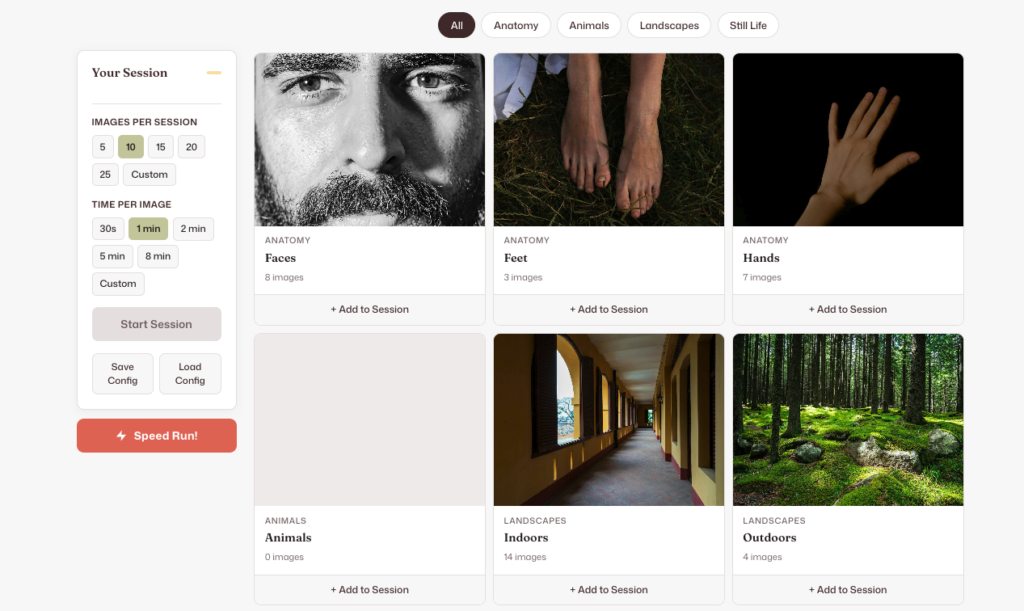
Photo Reference Generator
Free timed drawing app with student-safe photo references for anatomy, still life, animals & landscapes. No account needed — just start drawing.
Price: $0
Price Currency: USD
Operating System: Any
Application Category: Educational Application