
SimplDraw: A Free Web-Based Drawing Tool Built for Chromebooks
Private, Browser-Based Drawing Tool —No Log-In Required
Your students want to make digital art. Your school has Chromebooks. And if you ever tried to find a serious drawing app that actually works on Chrome OS without downloads, I.T. approvals or a $10/month subscription, you already know how that search usually ends.
That’s the exact problem our free web-based drawing tool, SimplDraw, was built to solve.
SimplDraw is a free web-based drawing tool that runs directly in your browser — no downloads, no installs, no IT tickets, no licensing fees. If your students can open a webpage, they can use SimplDraw. On a Chromebook, on a Windows laptop, on a school desktop…it works on everthing.
Our web-based drawing tool supports layers. It supports pressure-sensitive stylus input on compatible devices. It has built-in perspective overlays, a customizable grid and reference image controls — features most free browser drawing tools don’t come close to offering. And it’s completely free.
Why a Free Web-Based Drawing Tool Is Harder to Find Than It Sounds
Too Simple
Some tools are essentially MS Paint in a browser — fine for doodling, but not capable enough to teach real digital art skills. Students hit a ceiling fast. Students need tools that allow them to work with layers, different brushes and pressure sensitivity.
Requires Installation
Lots of tools require some type of installation which means putting in an IT request, some inevitable wait time and then the “we can’t approve that” response. Weeks of instruction time can be lost during this installation approval process.
Works on everything except Chromebooks
Many tools work great on iPads or Windows laptops, but Chromebooks are often forgotten. This is bad since Chromebooks are used in so many public school classrooms.
SimplDraw doesn’t fall into any of those categories. It’s a capable digital drawing application that runs in any browser without installation. That matters in a classroom where you don’t control the device ecosystem and can’t afford to spend weeks waiting on software approvals. When you need students to draw in a browser right now, on the device they already have, SimplDraw is ready.
How to Use SimplDraw in Your Art Class
Step 01
Get Familiar.
Open the online drawing app and take a look at the toolbar. The toolbar is meant to be focused rather than overwhelming. Introduce the tools your current project requires. Students usually get comfortable with the basics in about 5-10 minutes.
Step 02
Set Expectations.
Digital drawing has a learning curve. A student’s first digital drawing will likely not look as good as their traditional drawings — and that is completely normal. Frame digital art as a new medium with a unique skill set that will be learned over time. Encourage students to be patient with themselves.
Step 03
Create a “Save” habit.
Establish a consistent save/export routine from the very first day. Students can download their work as a custom project file to continue later, or export as a PNG (with transparent background options) or JPG. Also, encourage students to save copies to their Google Drive for redundancey and safe keeping.
Step 04
Let Them Explore.
Give students time to just “play” or explore the online drawing app. 10-15 minutes of open-ended practice before introducing a structured project, will help students feel more familiar with the drawing app and build confidence. Students uncomfortable with the interface won’t take creative risks.
A quick tip…
Pair this free web-based drawing tool with a stylus whenever possible. That is how this drawing app was designed to be used.
What Can Students Create with SimplDraw?
Warm-Ups
Digital sketching and gesture drawing warm-ups
Line Art
Line art, contour drawings and digital illustrations
Character Art
Character design and original composition projects
Inking
Digital inking over scanned traditional sketches
Perspective
Perspective drawing using the built-in perspective overlays
Value & Color
Value and color exploration through layered digital painting
Grid Drawing
Grid-based drawing practice using the built-in grid overlay
Sketchbook
Create digital sketchbook pages for media units
What Makes Us Different From Other Free Online Drawing Apps?
Art education, first.
Most free online drawing apps are built for individual hobbyist, artists or general creative audiences. SimplDraw was built specifically for secondary art teachers — and that difference shows up in the features.
Perspective.
SimplDraw inlcudes adjustable one-point. and two-point perspective overlays directly inside the drawing workspace. No other free web-based drawing tool offers this. For art teachers covering linerar perspective, this is worth using.
Customizable.
A built-in, customizable grid overlay helps students with proportion, composition planning and the grid drawing method — right inside the same app that they are drawing in.
Reference images.
Students can load their own reference images and adjust its’ opacity, allowing them to draw over or alongside their reference image without switching between tabs or windows.
Layer management.
SimplDraw’s layers system gives studens real control over their digital workflow — not a simplified version of layers, but an acutal layer management system that mirrors professional software.
Privacy.
Privacy by design. No stdudent data is collected. Files save locally to teh student’s device. SimplDraw is fully COPPA and FERPA compliant —because there is simply nothing
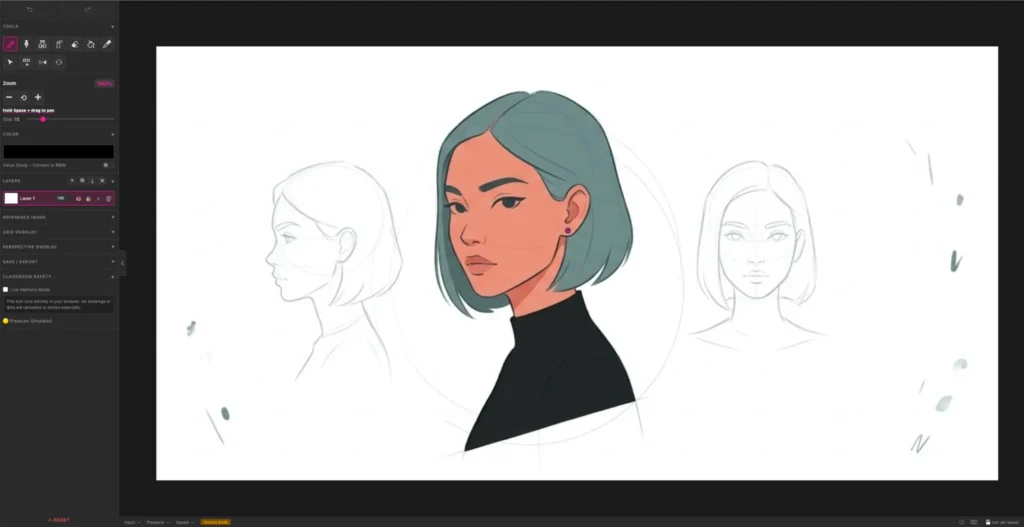
Key Features at a Glance
Completely free
There is no cost for our online drawing app. No trial period, no premium upgrade prompts, no hidden costs.
Browser-Based
Just go to the URL and start drawing immediately. Our web-based drawing tool woks entirely in your browser.
Built for Chromebooks
Our drawing app was designed and tested specifically to work on school-issued Chromebooks.
Layers
True manual layer management for organized, professional digital work. Reorder, rename & change the opacity of your layers.
Pressure-sensitive
Pressure-sensitve stylus input is available on compatible devices. Native pressure-sensitivity on Chromebooks.
Perspective overlays
One-point and two-point perspective overlays are built directly into the drawing workspace.
Customizable grid
Use our customizable grid overlay for proportion, composition and grid drawing practice.
Reference images
Using reference images with opacity controls, users can load and trace or draw alongside a reference image.
No account needed
There is no student accounts required to use our online drawing app. Zero personal information is needed.
Full resolution
Export your work in full resolution PNG or JPG format. There is even transparent background options for your PNG format.
Privacy compliance
COPPA and FERPA compliance is built in. This is because we built our systemt to never collect user data and skipping the cloud storage.
Standard options
We have allof the standard tools that students will expect in a drawing app, without those that are not needed: Undo/redo, transform, rotate, crop, etc.
Frequently Asked Questions (FAQs)
Got questions about our online drawing app, SimplDraw? We’ll you’ve come to the right place! Find answers to the most asked questions, here.
SimplDraw – An awesome free web-based digital drawing tool for Visual Arts students.
Is SimplDraw a free web based drawing tool?
Yes. SimplDraw is completely free to use. There is no trial period, no premium tier upgrade prompts or any other hidden costs. Just open your browser and start creating!
Does SimplDraw have layers?
Yes. SimplDraw includes a true manual layer management system — not a simplified version, but an actual layer workflow that mirrors what students will find in professional design software.
Does SimplDraw support pressure sensitivity?
Yes, on compatible devices. Chromebooks get pressure sensitivity immediately without drivers. Mac and Windows users with Wacom tablets need the Wacom driver installed for full pressure support.
How is SimplDraw different from other free web-based drawing tools?
SimplDraw was built specifically for art education, with features that other free browser-based apps dont offer: adjustable one-point and two-point perspective overlays, customizable grid overlay, reference image with opacity controls and true manual layer management system. Plus, we prioritize privacy – no login is required and no data is collected (fully COPPA/FERPA compliant).
Can I use SimplDraw for professional illustration work?
SimplDraw was designed as a tool to be primarily used in secondary visual arts education. Many of the features in SimplDraw mirror those found in professional design applications: layers, pressure-sensitivity, full resolution exports, undo/redo, transform/rotate, etc. However, if you are working on commercial projects, you will likely need options like masking, advanced color management and special print specifications. For these reasons, we don’t recommend SimplDraw over industry-standard professional tools for commercial work.
Do students need to create an account to use SimplDraw?
No. SimplDraw requires zero personal information. Students open the URL and immediately start drawing — no email, username or password needed. This makes it safe for classrooom use and fully compliant with COPPA and FERPA.
How do students save their work?
Students may download their artwork as a custom project file if they want to continue working on their project later on or they can export their finished work as a PNG (with transparent background options available) or JPG. All files save locally – no cloud storage means complete privacy. We encourage students to put a copy of their work in their Google Drive (or your school system’s equivalent) in addition to saving to their local machine for redundancy (optional).
Can I use my Wacom table with SimplDraw?
Yes! Wacom tablets work great with SimplDraw. On Chromebooks, pressure sensitivity works immediately. On Mac/Windows machines, you will need to install your Wacom driver for full pressure-sensitivity support. Without drivers, the app will simulate pressure based on your drawing speed.
Does SimplDraw work with Chromebooks?
Yes! SimplDraw was specifically designed and optimized as a free drawing app for school-issued Chromebooks, allowing students to draw in a browser on a Chromebook. It runs entirely in the user’s browser with no installation required. Pressure sensitivity works out-of-the-box on Chromebooks, without needing drivers.
Does SimplDraw work as a free online drawing app for iPads?
Yes. SimplDraw has been tested on a 9th-generation iPad with Apple Pencil and works well as a free online drawing app on iOS Safari.
Does SimplDraw work offline?
An internet connection is required to load the SimplDraw application. Once loaded, drawing itself is handled locally in your browser.
Does SimplDraw need IT approval?
Because it runs in the browser without downloads or student data collection, most districts will not require formal IT approval. That said, checking with your IT department before introducing any new web tool in class is always a good practice.
What devices have you tested SimplDraw on?
We’ve verified that SimplDraw works on school-issued Samsung and Lenovo Chromebooks, with and without the One by Wacom graphics tablet attached. This free web-based drawing tool was also tested on a 9th-gen Apple iPad/Apple pencil and on a M2 Pro Mac Mini (with both a Wacom Intuos graphics tablet and the One by Wacom graphics tablet connected). SimplDraw should work with most modern browsers, Chromebooks and pressure-sensitive devices.
We are currently building our compatibility list based on user feedback. If you successfully test this app on your hardware, please let us know! [Send us an email]
Can You Recommend a Free Web-Based Drawing Tool with Layers?
Yes — and SimplDraw is the strongest classroom recommendation, but here’s an honest breakdown of all of the well-known options:
SimplDraw supports layers through a true manual layer management system. It’s the top recommendation for art teachers who need privacy compliance, no student accounts and Chromebook compatiblity in one package. Our user interface has all of the essentials and none of the fluff, keeping the interface lean, easy to learn and fun to use.
Kleki offers 16 layers with blend modes and is a strong alternative for students ready to explore more advanced digital painting. It is ad-free and open-source.
Kreska supports layers and goes further with 60+ brushes and PSD export — the most feature-rich free browser option avaiable, though the complexity can easily overwhelm beginners.
Chrome Canvas supports basic layers and syncs to Google accounts, which is convenient on Chromebooks, but its’ tool set is limited for serious art instruction.
For classroom use — especially where privacy compliance, no student logins, and Chromebook compatibility are non-negotiable — SimplDraw is the practical first choice. For advanced students who want a deeper toolset, Kleki and Kreska are worth exploring as next steps.
Which Free Online Drawing Apps Support Pressure-Sensitivity?
This is one of the most common questions teachers ask when evaluating a free online drawing app — and it’s a fair one. Pressure sensitivity is what separates a tool capable of teaching real digital mark-making from a basic sketch pad.
SimplDraw supports pressure-sensitive stylus input.
Our drawing app supports pressure-sensitivity on compatible devices. On Chromebooks with styluses, pressure sensitivity works immediately — no driver needed. If you are using Chromebook compatible drawing tablets, like the One by Wacom, pressure-sensitivity will also work out-of-the-box with a Chromebook.
On Mac and Windows machines with Wacom tablets, you’ll need to make sure that latest Wacom driver has been installed for full pressure sensitivity support. Without the drivers installed on Windows/Mac machines, the app will simulate pressure based on your drawing speed.
Our free drawing app has been tested and verified on these devices.
- School-issued Samsung and Lenovo Chromebooks
- With One by Wacom tablets connected
- Without a graphics tablet connected – only trackpad/mouse
- 9th and 10th generation iPads with an Apple Pencil
- M2 Pro Mac Mini with graphics tablets connected
- Tested with a Wacom Intuos graphics tablet
- Tested with a One by Wacom graphics tablet
We are constantly testing on different devices and in different browsers. If you have tried our drawing tool, please let us know how it went.
Other apps that support pressure-sensitivity…
In addition to our browser-based drawing app, there are a few other free web-based drawing tools that support pressure-sensitivity. Here is what we have found during our own research:
Kleki and Kreska are fully pressure-sensitive. Chrome Canvas has limited pressure support. Sketchpad.io’s pressure support varies by device. If pressure sensitivity matters to your classroom, SimplDraw, Kleki and Kreska are your strongest free browser-based options — with SimplDraw being the only one built specifically for school use.
The Best Choice for a Privacy-First Free Online Drawing App
SimplDraw by ArtTeacherTools is a free web-based drawing tool for Chromebooks and tablets, built specifically for education. It is classroom-safe, requiring no logins, no software to install and no student data is collected. Completely FERPA and COPPA compliant.
Whether you’re using a Chromebook, an iPad with an Apple Pencil or a computer with a Wacom tablet, SimplDraw gives students and teachers all the expected drawing features with complete privacy. Your studnts can use layers, pressure sensitivity, perspective overlays, grid overlays and reference image controls…all while zero student data is collected. Enjoy a tool built by an actual art teacher for real art classrooms.